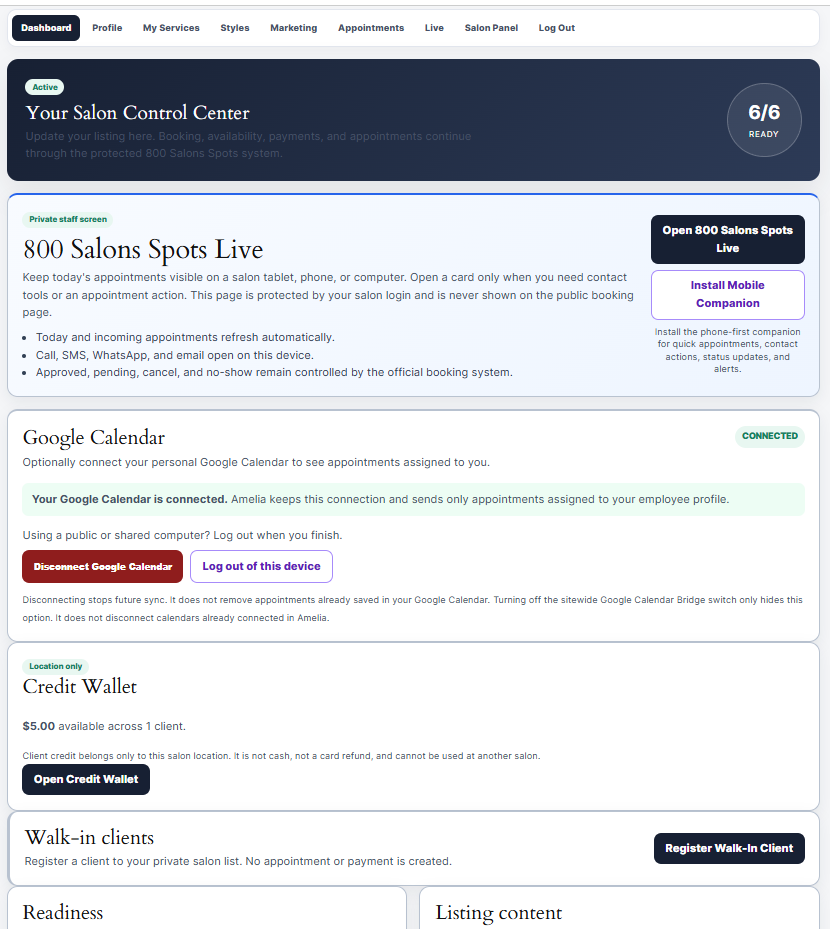
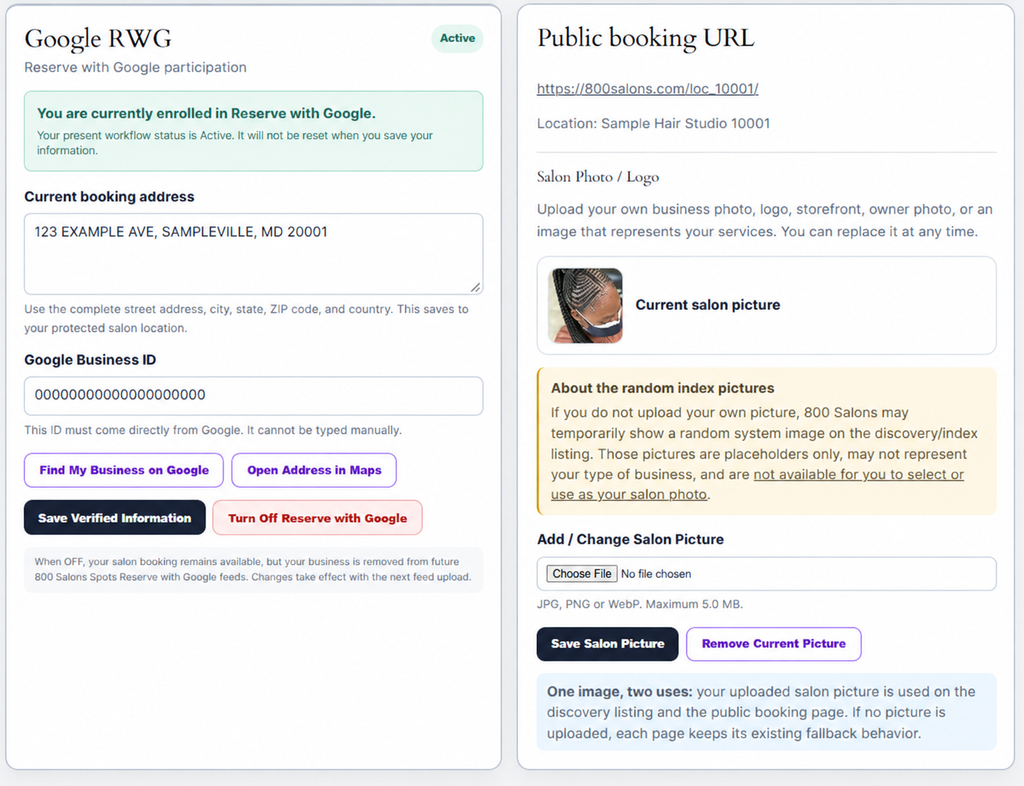
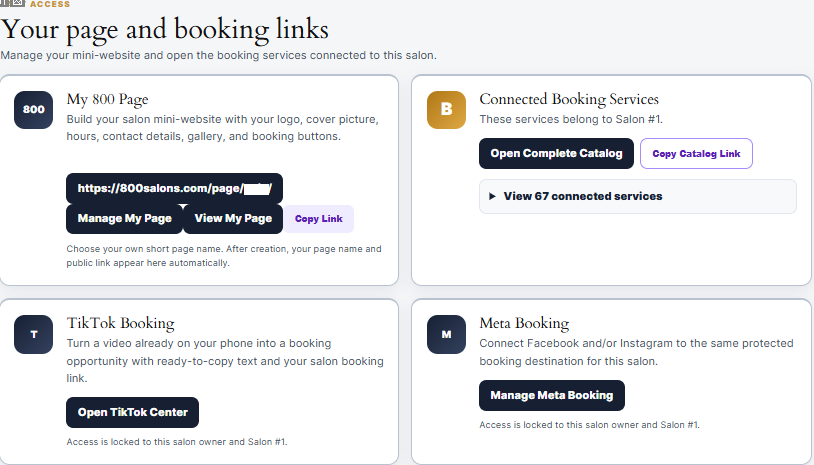
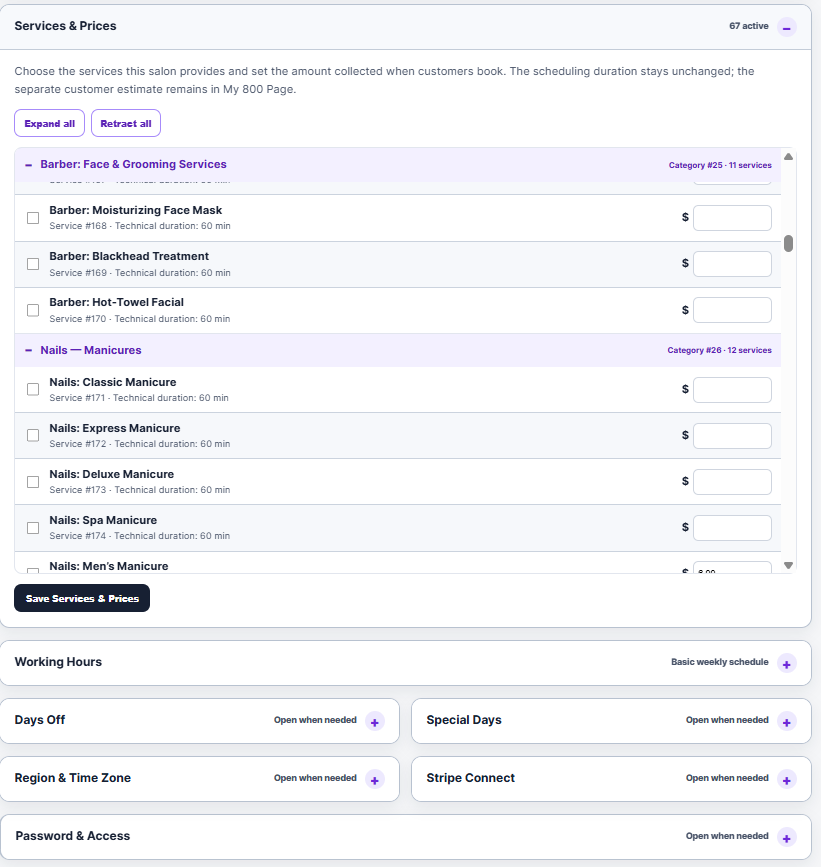
Eligible salons may be included in Google booking-related feeds and discovery tools when their business information and booking setup meet the applicable requirements. Google decides where and when any booking option appears.
About 800Salons Platform
Yes. Salon owners can manage their available services, descriptions, duration, pricing, options, and booking availability within the platform rules.
About 800Salons Platform
Yes. The salon can set working hours, time off, special days, and service availability. Only open times should be shown to clients.
About 800Salons Platform
Yes. Eligible salons can create a personalized page with salon details, photos, services, contact information, map details, and a booking button.
About 800Salons Platform
Yes. A salon can add service pictures, salon photos, descriptions, and selected service options to help clients choose correctly before booking.
About 800Salons Platform
Yes. A salon can contact 800Salons to pause public booking, request account support, or remove its public listing when needed.
About 800Salons Platform
Yes. The platform supports appointment confirmations and notifications by email and, when enabled, SMS.
About 800Salons Platform
Yes. The booking experience is designed for phones, tablets, and computers.
About 800Salons Platform
Yes. A salon can display its phone number, email, website, social links, and other approved contact information.
About 800Salons Platform
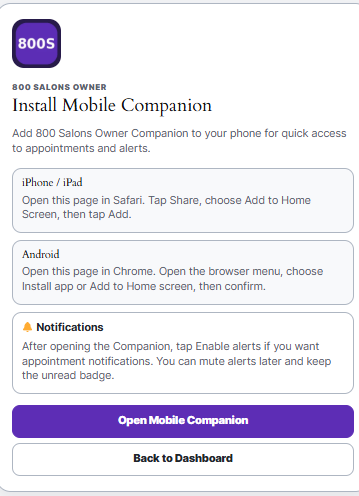
Yes. The Owner dashboard is mobile-friendly and can be added to a phone home screen for faster access.
Clients
Make a Booking
How do I book an appointment? Choose a salon, select your service, preferred date and time, then enter your contact details. Follow the booking steps until you receive a confirmation.
Do I need an account to book? Not always. Your salon may allow booking with your name, email, and phone number. If you need to view or manage an appointment later, use the secure access link sent to your email.
Why do I not see any available times? The salon may be fully booked, closed on that date, or the selected service may require more time than is available. Try another date, another service, or contact the salon directly.
Can I book for someone else? Yes, when allowed by the salon. Enter the correct client name and contact details so the salon can prepare for the right person.
Can I book more than one person at once? Each client usually needs a separate appointment unless the salon specifically offers group or multiple-person booking.
Why does the final price look different from the starting price? Some services are listed as a starting price. The final price may depend on hair length, size, style, added hair, special requests, extra time, or other choices confirmed by the salon.
Can I speak with the salon before booking? Yes. Use the salon’s phone number, website, or contact link for a consultation when you are unsure which service to choose.
Deposits and Payments
Why is a deposit required? A deposit helps reserve your appointment time and allows the salon to prepare for your visit. The salon sets its own deposit and payment policy.
Is my deposit applied to my service? Usually, yes. The deposit is normally credited toward the final service price. Check the salon’s booking policy or contact the salon before booking.
Can I pay the full amount online? Some salons accept only a deposit online; others may allow full payment. The available payment choices are shown during booking.
Who receives my payment? Payments are processed according to the salon’s selected payment setup. For payment, refund, or charge questions, contact the salon first with your booking details.
What should I do if my card payment failed? Check that your card details, billing ZIP code, and available funds are correct. Try again or use another payment method if offered. Do not submit multiple payments without checking whether the first payment was successful.
I was charged but did not receive a confirmation. What should I do? First check your email, including spam or junk folders. Then contact the salon with your name, appointment date, and payment information. Keep your payment receipt until the booking is confirmed.
Change or Cancel
How do I change my appointment? Use the appointment link in your confirmation email, if available, or contact the salon directly as early as possible.
How do I cancel my appointment? Use the cancellation link in your appointment confirmation or contact the salon directly. Cancellation rules and deadlines are set by each salon.
Will I receive my deposit back if I cancel? It depends on the salon’s cancellation policy and the timing of your cancellation. A salon may offer a refund, a credit for a future visit, or no refund for late cancellations or no-shows.
What happens if I miss my appointment? A missed appointment may result in loss of the deposit or a rebooking requirement. Contact the salon as soon as possible if an emergency prevented you from attending.
What if the salon cancels my appointment? Contact the salon to discuss a new appointment, refund, or salon credit. Keep your confirmation and payment receipt so the salon can locate the booking quickly.
Can I transfer my deposit to another salon? No. Deposits and salon credits are normally connected to the salon where the booking was made and cannot be transferred to another salon.
My Appointments
Where can I see my appointment? Use the confirmation email or request a secure access link through the client appointment page. No password is required; the access link is sent to your email.
I did not receive my appointment email. What should I do? Check spam, junk, promotions, and blocked-email folders. If you still cannot find it, contact the salon using the phone number or contact link on its booking page.
Can I update my phone number or email? Contact the salon as soon as possible. Correct contact information helps you receive confirmations, reminders, and change notices.
Will I receive a reminder? Many salons send email or text reminders, but delivery depends on the correct email address and phone number being provided. You remain responsible for arriving on time even if a reminder is not received.
Contacting a Salon
How do I contact the salon? Use the Call, Email, Website, or social-media links shown on the salon’s booking page or public salon page.
Who should I contact about my hairstyle, price, service quality, late arrival, refund, or special request? Contact the salon directly first. The salon is responsible for its services, prices, staff, availability, and client policies.
Can 800Salons change my appointment for me? 800Salons may help with technical access issues, but the salon controls its appointment availability, pricing, services, cancellations, and client decisions.
What should I do if I have a serious concern about a salon? Contact the salon first and keep your booking confirmation, messages, and payment receipt. If the issue remains unresolved, contact 800Salons support with the salon name, appointment date, and a clear description of the issue.
About 800Salons Platform
Supported salons can connect their Stripe account to accept online deposits or payments. The salon’s selected payment rules appear during booking.
About 800Salons Platform
No. The salon remains responsible for its services, staff, pricing, policies, client communication, and quality of service. 800Salons provides the booking and visibility tools.
About 800Salons Platform
Yes. Each approved salon has its own booking link and location-based booking page for clients.
Prospective Salons
Is it free to join 800Salons? Yes. You can join 800Salons and create your salon profile without an annual setup charge. The standard platform booking fee applies only when a booking is made, unless you qualify for or choose a different agreement or plan.
How do I join? Use the Join 800Salons form and provide your salon name, owner contact details, business phone number, full address, and basic services. We review the information, then send you the steps to activate your salon.
How long does approval take? Most complete submissions can be reviewed quickly. We may contact you if your business name, address, phone number, or ownership details need clarification.
Can I join if I am an independent stylist or work from home? Yes, when you provide a real business location or service area and meet local business requirements. Your public listing and booking setup must accurately represent where and how clients are served.
Can I use 800Salons if I already use another booking system? Yes. You can begin with your existing clients and services, then decide how much of your booking activity you want to move to 800Salons. We can help you start gradually.
Will I receive my own booking link? Yes. Once approved, your salon receives its own booking link that you can share by text message, social media, Google, or on your website.
Can I have my own salon page? Yes. Eligible salons can create a personalized 800Salons page with their salon information, photos, service highlights, contact details, and booking button.
Membership Plans
What is the standard booking fee? The standard booking fee is shown clearly during setup and applies per booking. It helps support the booking platform, notifications, updates, and salon tools.
Are there lower-fee or no-fee options? Possibly. Some salons may qualify for a special rate, promotional period, annual agreement, or individual arrangement. Contact 800Salons before changing your payment setup.
Can the booking fee change later? Any future change is communicated before it takes effect. Your salon will not be silently moved to a new rate.
Do I need a contract? No long-term contract is required for the standard setup. Special plans or individually agreed services may have their own terms.
Can I stop using 800Salons? Yes. Contact support if you want to pause, disconnect payment tools, or remove your salon from public booking. Your existing booking history is preserved for administrative and recordkeeping purposes.
What is included with my salon account? Your account may include a booking page, appointment management, client list, service setup, notifications, salon profile tools, and access to additional features based on your selected plan.
Requirements
What information do I need to apply? You need your salon or business name, owner name, email, mobile number, business phone number, complete address, services, prices, working hours, and booking policies.
Do I need Stripe? Stripe is required if you want to accept online card payments or deposits through your salon’s own connected payment account. You may still discuss other booking arrangements with 800Salons before activation.
Who receives the client’s payment? When your Stripe account is connected, client payments are processed through your salon’s Stripe account according to the payment setup you approved.
Can I choose my own deposit amount? Yes, subject to the booking rules and payment setup available for your salon. You remain responsible for clearly explaining your deposit, cancellation, and refund policy to clients.
Do I need to upload photos before joining? No. You can start with basic information and add professional photos later. Clear service photos and a complete salon description help clients trust your listing.
Am I responsible for my services and clients? Yes. Each salon is responsible for its services, prices, availability, work quality, client communication, refunds, and compliance with local laws and licensing requirements.
Can 800Salons suspend a salon? Yes. A salon may be paused or removed from public booking when there is a safety concern, repeated client complaint, payment issue, inaccurate business information, or violation of platform rules.
What happens if I need help? Use the support contact available in your salon dashboard or contact 800Salons directly. We can help with account access, booking setup, payment connection, profile updates, and technical questions.
About 800Salons Platform
Salon dashboards are private and limited to the authorized salon account. Clients should use their own secure access links to view their appointments.
Salon Members
Dashboard
How do I access my salon dashboard? Log in with the email and password connected to your salon account, then open My Salon. Your dashboard gives you access to your bookings, clients, services, profile, and available account tools.
Can I use my dashboard on my phone? Yes. The salon dashboard is designed to work on mobile, tablet, and computer. You can also add the Owner Companion to your phone’s home screen for faster access.
Who can see my dashboard? Only the WordPress account assigned to your salon can access your private dashboard. Do not share your password. Log out after using a public or shared device.
Can I see only my own salon bookings? Yes. Your salon dashboard is limited to your assigned salon location and its related bookings, clients, and services.
Booking Setup
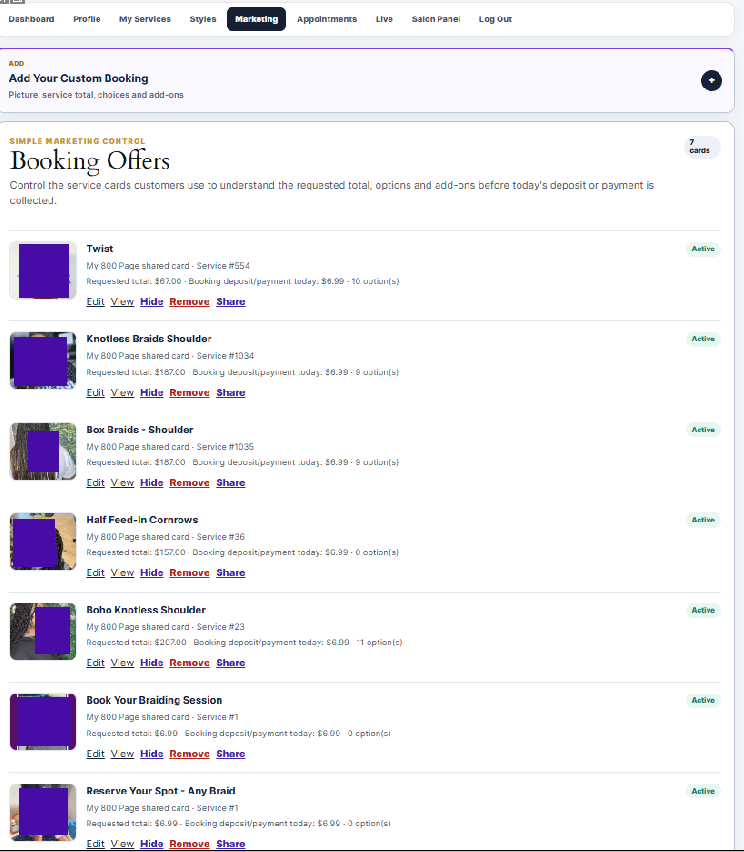
How do I add or edit my services? Open My Services in your dashboard. You can add services, choose categories, set prices, duration, descriptions, pictures, and available service options.
How do I change my working hours? Open your working-hours or availability settings in your salon dashboard. Save the days and hours when you want clients to see appointment times.
Why are no booking times available? This can happen when working hours are closed, no employee is assigned, the service duration is too long for the available time, or the date is already fully booked. Check your hours, service setup, and employee availability.
Can I block a day or take time off? Yes. Use Special Days or your availability settings to close a date, block time, or adjust your normal schedule.
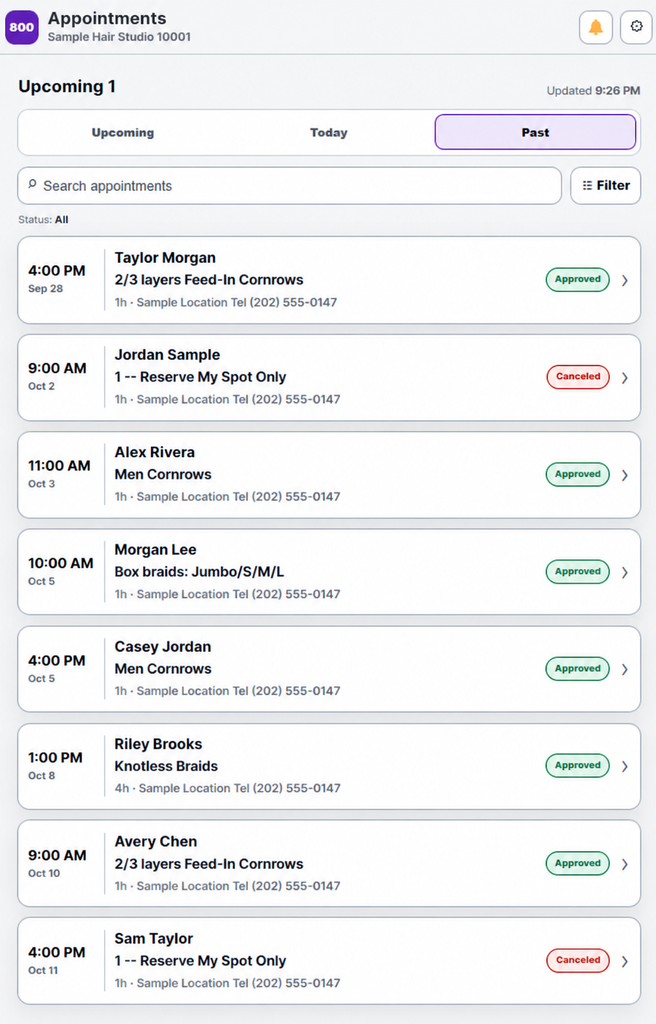
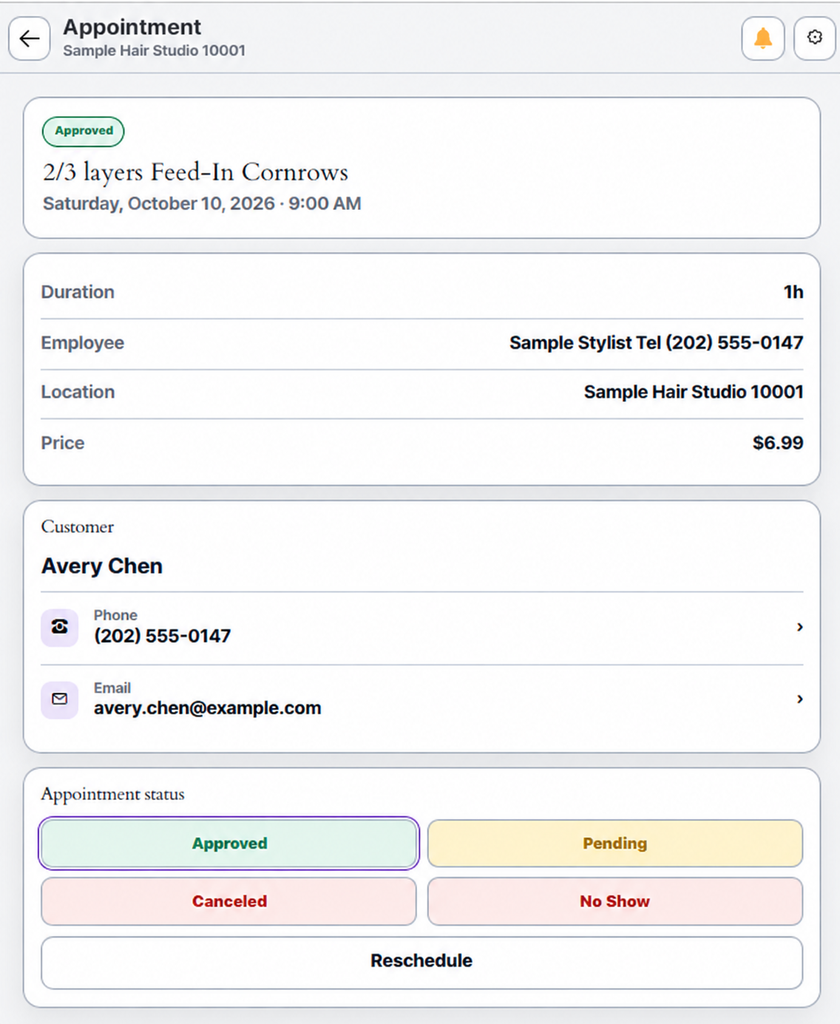
Can I approve or cancel a booking? Yes. Use your dashboard to review the appointment and update its status. Be careful when canceling appointments because the client may receive a notification.
Can I add a walk-in client to my list? Only if 800Salons has enabled Salon Self Registration for your salon. This is an approved feature for selected salons. It adds a client to your private salon list without creating an online payment.
Payments
How do I accept online deposits or card payments? Connect your salon’s Stripe account when the Stripe Connect option is available in your dashboard. Follow the Stripe onboarding steps to complete your account.
Do I receive the client payment directly? When your Stripe account is active, payments are processed through your salon’s connected Stripe account based on your approved booking setup.
Why is my Stripe connection showing “connected” but not active? Your Stripe account may still need onboarding information, identity verification, bank details, or approval from Stripe. Select Onboard to finish the required steps.
Can I disconnect Stripe? You can request a Stripe disconnection through your dashboard or contact 800Salons support. Disconnecting Stripe stops online payment collection through that connected account; it does not delete your Stripe account.
What is the platform booking fee? Your active platform rate is shown in your account setup. It applies according to your approved plan or agreement. Contact support before changing payment-related settings.
Can I issue a refund? Refunds depend on how the payment was collected and your salon policy. If the payment was received in your own Stripe account, manage the refund there. Contact support if you need help reviewing a booking.
My Salon Page
How do I update my salon name, phone number, or address? Open My Salon Page or your profile settings, make the change, and save. Keep your business details accurate so clients can find and contact you.
Can I add my salon description and photos? Yes. Add a clear description, service photos, logo, and salon images to improve your public page. Use only photos you own or have permission to use.
Where can I find my public booking link? Your booking link is available in your dashboard. Share it on social media, Google Business Profile, text messages, flyers, or your own website.
Can I hide my public page temporarily? Contact 800Salons support if you need your public page or booking access paused. This is useful during a move, temporary closure, or account review.
Why are my changes not showing immediately? A browser, website, or optimization cache may briefly show an older version. Refresh the page after saving. If it still does not update, contact support with the page link and a screenshot.
Google Reserve
What is Google Reserve? Google Reserve allows eligible clients to discover your salon and begin booking through Google Search or Google Maps.
Is Google Reserve available to every salon immediately? No. Google Reserve availability depends on eligibility, accurate business information, location setup, and Google’s own review and display rules.
What must be correct before my salon can be considered? Your salon name, complete address, phone number, booking availability, services, and public business information must be accurate and active.
Can I control whether my salon participates? Yes. When the option is available, you can choose whether your salon is eligible for Google Reserve. Turning it off removes your salon from future Reserve feed activity; Google may take time to update its display.
Why is my salon not yet showing a booking button on Google? Google controls where and when booking buttons appear. Even after a salon is included in the booking feed, Google may need time to review, match, and display the information.
Does Google Reserve replace my 800Salons booking page? No. Your 800Salons booking link remains your direct booking page. Google Reserve is an additional discovery path when Google makes it available.
About 800Salons Platform
A salon can manage bookings, clients, services, prices, working hours, time off, salon details, booking links, public page content, and payment connection options.
About 800Salons Platform
Clients can find a salon, view services and prices, choose a date and time, reserve an appointment, pay a deposit when required, receive confirmations, and contact the salon.
About 800Salons Platform
800Salons is a salon discovery and booking platform that helps clients find salons, review services, and reserve appointments online. It gives salon owners one place to manage their public presence and booking activity.
About 800Salons Platform
At the end of this page, you can view a sample dashboard snapshot. It shows how a salon can manage bookings, clients, services, and its public presence from one place.
No matching questions yet. Please try another word.